v13.1 Veeam High Availability (HA) Improvements

In my last blog post, I covered the basics and requirements of HA in v13.0.1. With a short how-to and a step-by-step guide, I wanted to show how quickly HA can be set up in your own environment and what added value it brings.
In my day-to-day work as a Systems Engineer at Veeam, I've also come into contact with HA at many customer sites. Most of the feedback was positive, but unfortunately there were also some issues around stability and node connectivity. That's why I'm even more excited about the release of v13.1, which brings further improvements to this topic.
In this article, I want to focus on these improvements: what's changing in the new version, and what else we can expect.
For everyone who just wants the summary, here's the TL:DR:
TL:DR
Requirements for HA remain unchanged (2x VSA, VDP Premium license, Remote Console) — HA is still exclusive to the Veeam Software Appliance.
Cross-subnet deployment: HA nodes no longer need to be in the same subnet. A cluster DNS name now resolves to two external IPs (one per node) via round robin, with the primary node accepting connections and the secondary rejecting them.
User synchronization: users created on the primary node are now automatically synced to the secondary node every 2–3 minutes (read-only on the secondary).
Private fixes synchronization: private fixes are now synced from primary to secondary as well; installation is blocked on the secondary.
More transparency: switchovers now show the replication lag and let you choose whether to wait for full sync or proceed anyway; the Remote Console also indicates when the secondary node is being updated.
Edit HA cluster: cluster settings can now be edited without disassembling and recreating the cluster.
REST API: full HA cluster management (create, edit, switchover, failover, disassemble) is now available via REST API.
Basics and Requirements - Again
To avoid repeating everything we already discussed last time, here's a short recap (you can find the previous post here -> Link). Even in the newest version, the requirements remain the same. We still need:
2x VSA
VDP Premium license
The Remote Console, to initiate switchovers and failovers or to configure HA in general
So HA will continue to be available only on the Veeam Software Appliance. That said, the aggressive expansion of the WebGUI is a good sign for HA. We can expect that operations such as setting up an HA cluster, or performing switchovers and failovers, will be configurable via the WebGUI in the future.
Cross-Subnet Deployment
Many customers gave immediate feedback when HA was released in v13.0.1: why did both nodes have to be in the same subnet? In practice, many components are split across different network segments or entire sites, either to support DR strategies or to improve resilience. Sure, there were workarounds, but nothing Veeam delivered out of the box — which was a blocker for many.
Good news: this limitation has been removed in v13.1.
Instead of relying on a single cluster IP (or cluster DNS name) to connect to the HA cluster, a cluster DNS name is now used. When this name is resolved via DNS, it returns two external IP addresses in round-robin fashion — one per node. The cluster is designed so that the "correct," i.e. primary, node accepts the connection, while the secondary node refuses it. In addition, each node now has an additional internal IP address for node-to-node and internal cluster communication.
So the important thing to know: DNS needs to work, and HA handles everything else in the background.
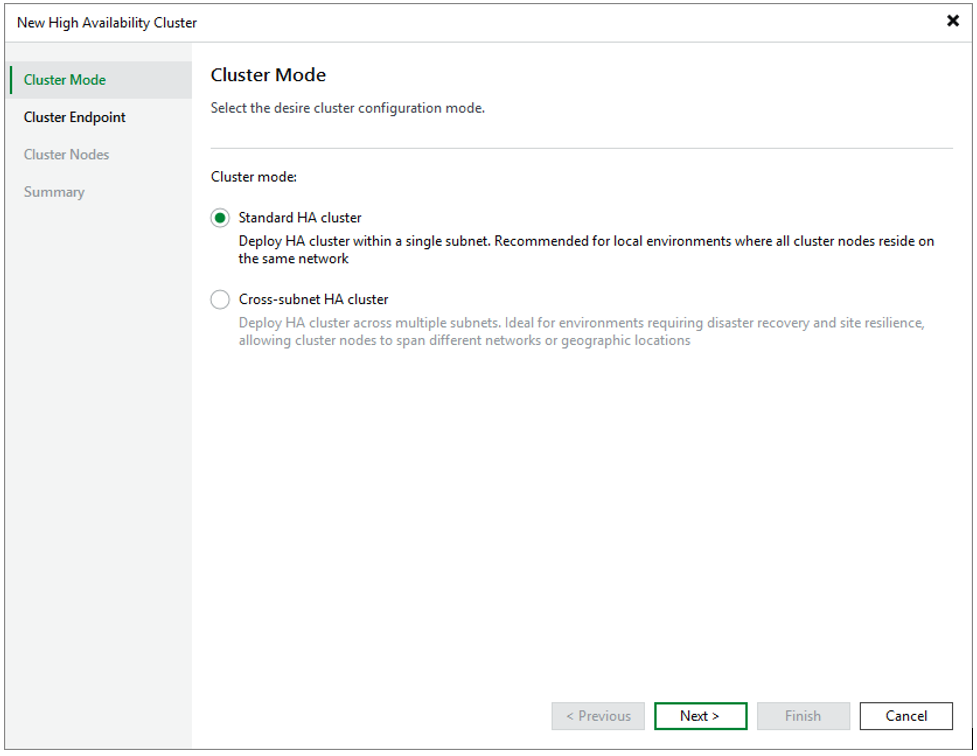
If you still want to use a standard HA cluster (same subnet), the setup doesn't change compared to v13.0.x. We still need a cluster IP, a cluster DNS name, a primary node IP,
and a secondary node IP, as shown here:

And now, by comparison, the cross-subnet HA cluster:
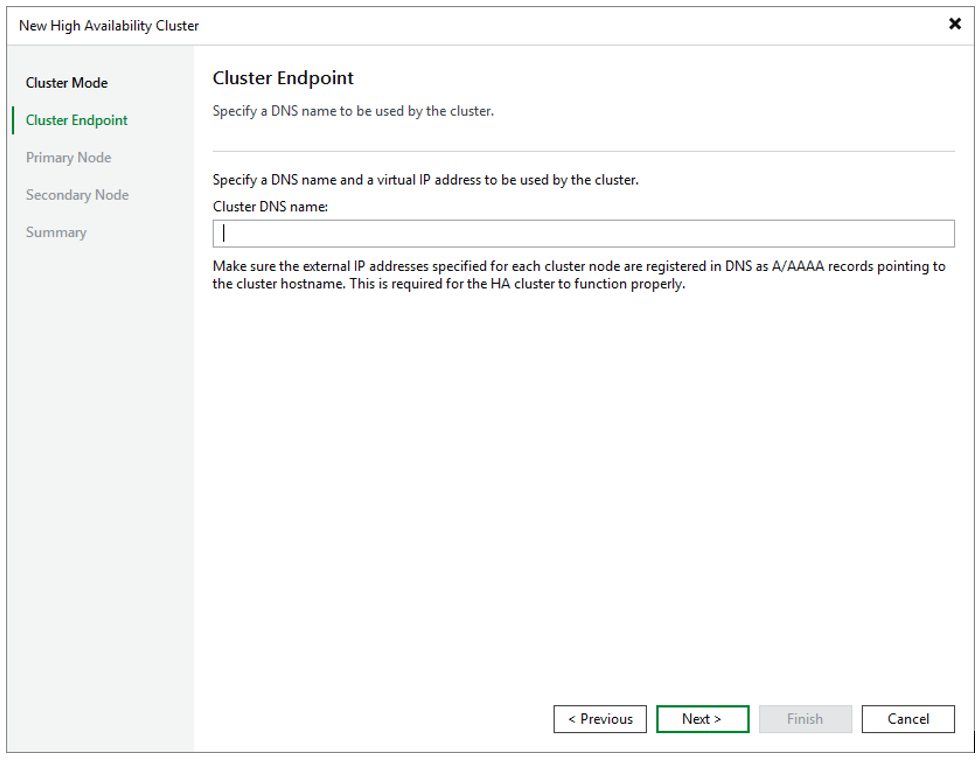

After that, it should look something like this:

As we already know, the console caches the IP addresses of both nodes. So in a worst-case scenario, we don't need to determine the IPs first — we already know exactly where to connect and which node is (or still is) the primary. This is handled via the corresponding firewall rules on the nodes: the primary allows connections, while the secondary drops them. While testing this in my homelab, I also noticed that the WebGUI on port 443 is blocked on the secondary node. This way, you can always be sure you're connected to, and working on, the primary node.
Just make sure you have configured the DNS server settings for the HA cluster with a cross-subnet configuration:
• DNS name resolution for the cluster
• Two A (or AAAA) records for the same cluster hostname, one for each external IP. When a client resolves the cluster hostname, the DNS returns both addresses.
User Synchronization
One thing that wasn't at all obvious after an HA deployment — and was only listed under Known Issues in the Help Center — was that users on the primary node were not synchronized to the secondary. This resulted in failed logins, missing permissions, and general confusion.
This behavior has now been changed. Users on the primary node are synchronized to the secondary every 2–3 minutes. If you want to edit these users, you need to do so on the primary, since the synced-over users on the secondary are only available in a read-only state.
Please keep in mind that user synchronization completely replaces the users on the secondary node with those on the primary node. This includes the following data:
- Passwords
- MFA Configurations
In addition, during my lab tests, I noticed some limitations depending on whether Security Officer is used or not. User synchronization only works if the Security Officer status matches on both nodes—that is, either SO is configured on both nodes or on neither.
Private Fixes Synchronization
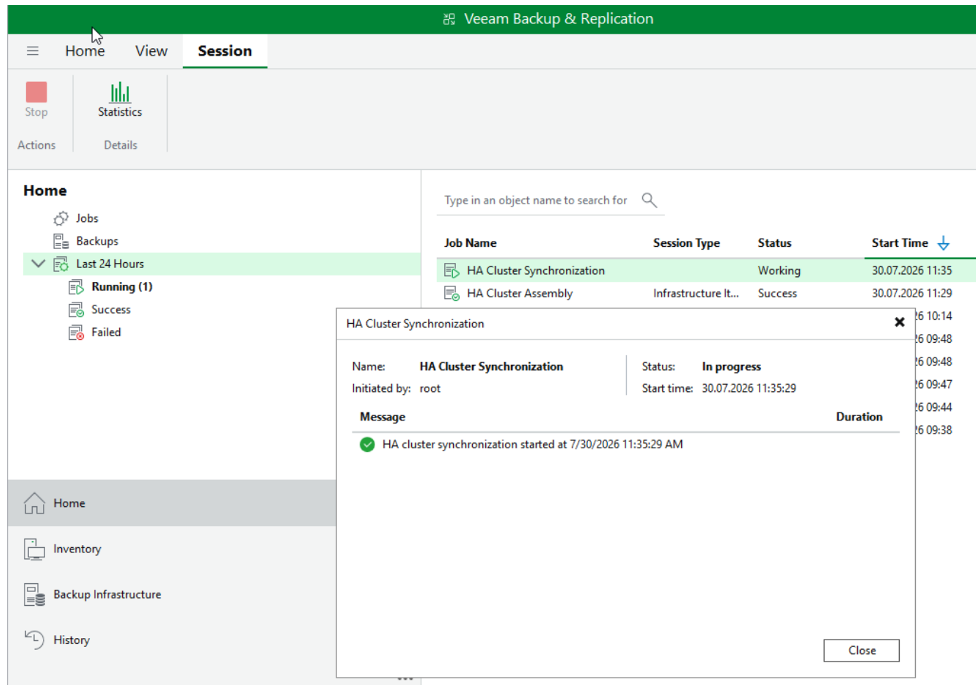
Similar to users, private fixes are now synchronized from the primary to the secondary node. Here too, the secondary node blocks the installation of fixes, since the same principle applies: the primary is the only source of truth.
Please also note that private fixes that were already installed before the cluster was created will not be synchronized.
This synchronization process can also be observed in the VBR console:
More Transparency About HA Switchover and Upgrade
Under certain circumstances — for example, right after creating an HA cluster — it can happen that all settings and configuration haven't been fully synchronized from primary to secondary yet. We now have the option, during a switchover, to decide whether to wait for synchronization to complete or to accept a replication lag of X MB/GB. This gives us more control and transparency over management. What I find especially nice here is the display showing how large the lag is and what the last known state was. The following message then appears:

(not my screenshot)
Separately from this, the Remote Console now also shows when the secondary node is being updated — a small but important addition for more transparency.
Edit HA Cluster Capability
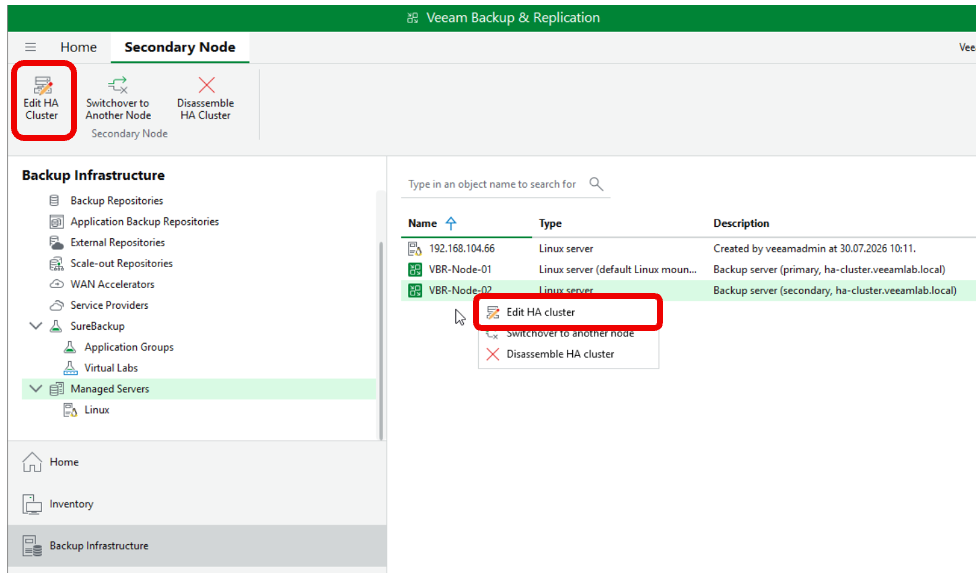
This improvement will make every Veeam homelab owner happy — at least it made me happy :D. I can't count how many times I had to disassemble an HA cluster just to test various use cases, or because I wanted to adjust the cluster itself. Fortunately, this setting was added, allowing you to edit the cluster without having to disassemble and recreate it.
REST API Enhancement
HA cluster management can now also be controlled via REST API. This includes the operations already available in the Remote Console:
Create cluster, in both standard and cross-subnet mode
Edit cluster
Switchover
Failover
Disassemble cluster
Summary
All in all, a really nice quality-of-life update with more insight behind the scenes.
